Menu
Your Cart
Take a look at the references of more than 60 OpenCart webshops we have completed so far!

billingo.hu invoicing extension for OpenCart 4 stores

billingo.hu invoicing extension for OpenCart 4 stores
New
billingo.hu invoicing extension for OpenCart 4 stores
24,990 Ft
Ex Tax: 19,677 Ft
  • Model: billingo-oc4
  • Opencart version: 4.x.x.x

Available Options

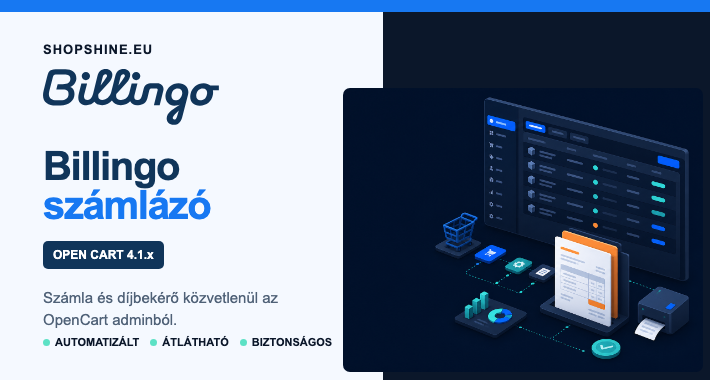
Billingo invoicing in the OpenCart 4 admin
shopshine.eu

Billingo
Invoicing

Modern Billingo
invoicing extension
for OpenCart 4.x.x
stores.

Compatible with OpenCart 4.x.x

Directly from the admin

Invoices and proformas in one place

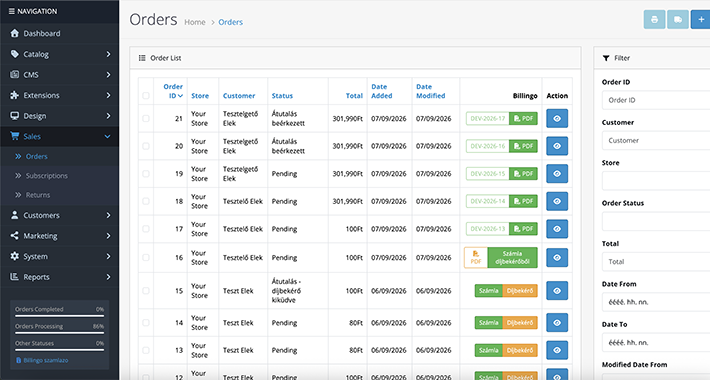
Create Billingo invoices and proformas from the OpenCart order list or order detail page. Issue a final invoice from an existing proforma with one click.

01

Fast document creation

Create invoices and proformas from the order list or order detail page through Billingo API V3.

02

Invoice from proforma

Create a proforma for bank-transfer orders, then issue a final invoice when payment arrives.

03

Automated invoicing

Secure cron automation based on order status, payment method, shipping method and store.

04

Accurate VAT and totals

Net or gross handling for totals and shipping, rounding correction and VAT overrides.

05

Customer PDFs

Billingo PDFs are available in the admin and in each registered customer's account.

06

Multistore and licence

Per-store fine tuning, multistore support and built-in Shopshine domain licence validation.

Simple workflow

Clear invoicing for every order

1. ConnectionBillingo API key, invoice block and Shopshine licence.
2. RuleMatch status, payment, shipping method and store.
3. DocumentAn invoice or proforma is created in Billingo.
4. AccessPDFs in the admin and customer account.

Compatibility

OpenCart 4.x.xPHP 8.1-8.3Billingo API V3Shopshine domain licence

Important

Requirements and notes

A Billingo account, valid API V3 key and Shopshine domain licence are required. Billingo pricing and terms are governed by Billingo; this module does not include a Billingo subscription or API traffic fees.

Informations
Opencart version4.x.x.x

1. Installation - OpenCart 3

1. In the OpenCart admin panel, go to "Extensions > Installer".
2. Upload the current installation package with the ".ocmod.zip" extension.
3. Then go to "Extensions > Modifications" and refresh the modifications.
4. Go to "Extensions > Extensions > Modules", then install the "Billingo Invoicing - shopshine.eu" module.

1. Installation - OpenCart 4

1. In the OpenCart admin panel, go to *Extensions > Installer*.
2. Upload the `shopshine_billingo_oc4_1.0.0.ocmod.zip` file.
3. Under *Extensions > Extensions*, select *Modules*, install the Billingo module, then open its settings.
4. Enter and verify the ShopShine license key, the Billingo API V3 key, and select the invoice block.
5. Save the settings, then configure the invoicing rules and, if necessary, the cron job.

2. License Activation

1. Enter the license key received when purchasing the module from shopshine.eu.
2. Click the "Verify License" button.
3. After successful verification, the module is ready to use.

3. Billingo Connection Setup

1. Enter your Billingo API V3 key.
2. Click the "Test Connection" button.
3. Click the "Get Invoice Blocks" button.
4. Select the desired invoice block.

4. Basic Invoicing Settings

- choose whether Billingo should send an email to the customer
- enter the invoice and proforma invoice notes
- specify whether OpenCart order total rows should be treated as net or gross values
- if necessary, select the custom field used for the tax number

5. Store-Specific Settings

If multiple stores are managed from the same OpenCart admin panel, you can configure a separate invoice block, language, email sending option and note for each store.

If you only have one store, or you do not configure the default store separately, the module's main settings will remain in effect.

6. Automatic Invoicing

1. Generate a cron key.
2. Copy the cron URL.
3. Set up a scheduled task in your hosting control panel to call this URL.
4. Create automatic rules based on order status.

Examples:
- automatically create an invoice when an order reaches a specified status
- automatically create a proforma invoice when an order reaches a specified status
- automatically create an invoice from a proforma invoice

7. Customer PDF Documents

If the "PDF documents in customer account" option is enabled, customers can open their generated Billingo PDF documents directly from their account.

8. Important Information

- the module uses the Billingo API V3 connection
- the cron job only processes orders that match the configured rules
- the start date prevents automatic invoicing of older orders retroactively
- successful and failed automatic runs are logged

Write a review

Please login or register to review
We use cookies and other similar technologies to improve your browsing experience and the functionality of our site. Privacy Policy.